¶ Overview
This post brings together foundational work by Gartner (2005-2006) on Host-Based Intrusion Prevention, the ASD's ISM (2026 when this post is being written), and the Industrial Internet Consortium's Security Framework.
See → cyber-security-principles for doctrinal guidance
The most related ISM “protect” principles:
- PRO-04 – Secure configuration management: Systems (infrastructure, operating systems and applications) are securely configured to approved and maintained baselines, including by reducing attack surfaces and attack paths, with configurations continually monitored and consistently enforced.
- PRO-07 – Trustworthy software: Systems (operating systems and applications) only permit the execution of software that is supported, verified and authorised.
- PRO-18 – Network segmentation and segregation: Systems (infrastructure, operating systems and applications) are segmented into network zones based on business criticality and trust levels, with only authorised, controlled and monitored inbound and outbound communication paths between network zones permitted.
The Industrial Internet of Things Security Framework (v1 pdf, v2 pdf) gives a good visualisation of the landscape. the runtime/deployed state as well as the other layers that have an effect.
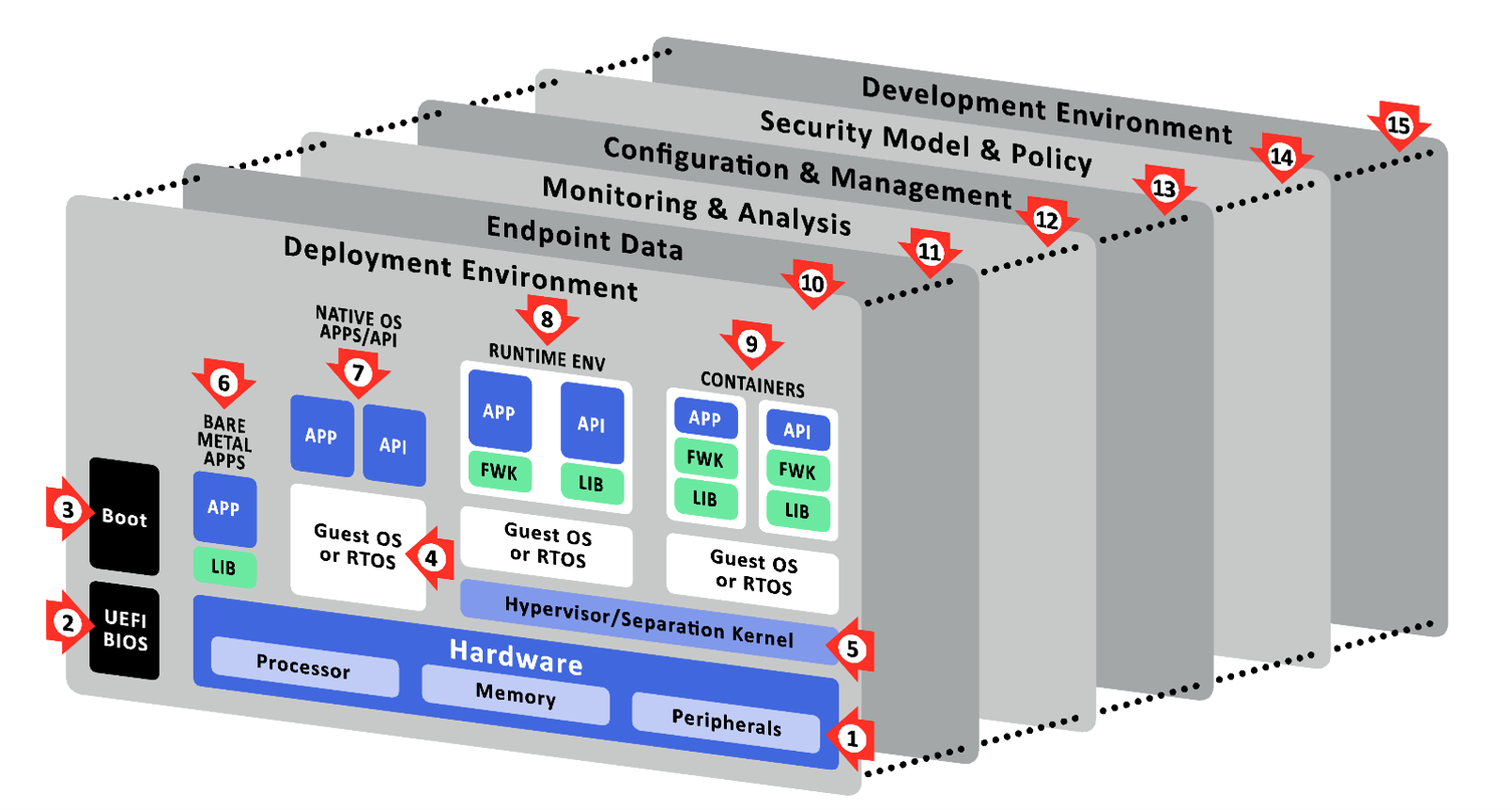
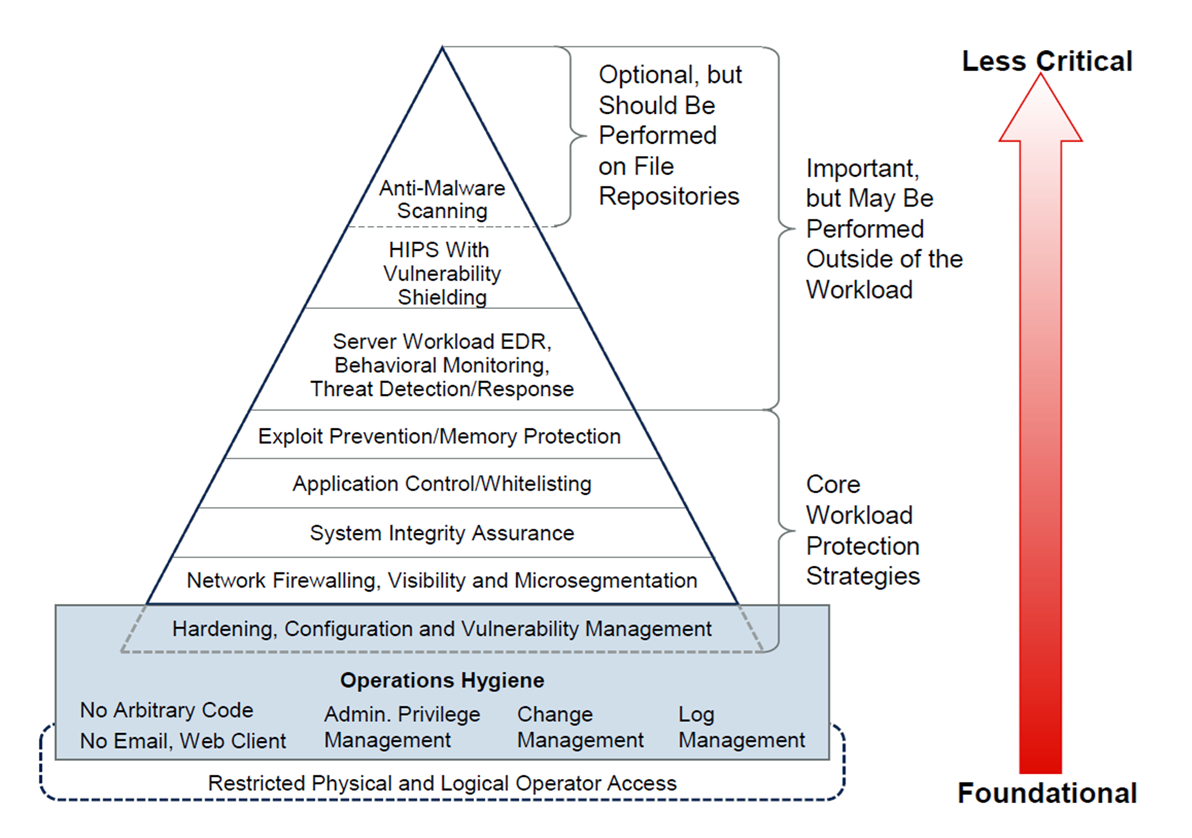
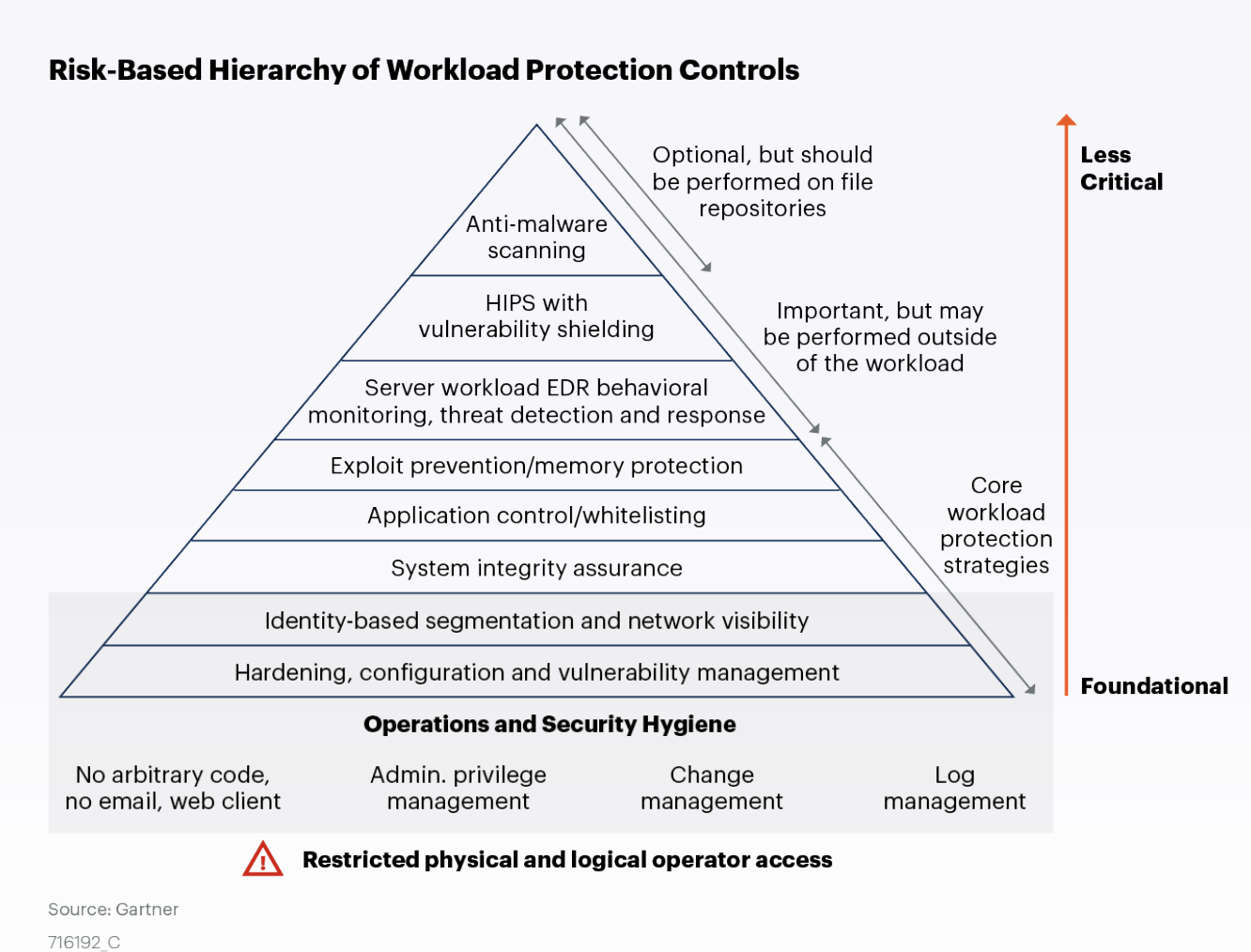
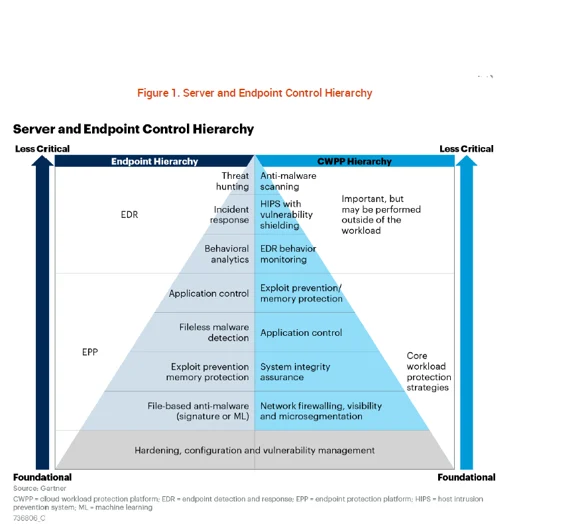
Gartner released a concept of layers of defence for hosts. The ISM has Guidelines-for-system-hardening which is the most applicable. But also a few others like Guidelines-for-system-management , Guidelines-for-gateways. ASD's guidance (including the ISM) takes a different approach to this Gartner one, but the two can be connected together. The ISM having it's origins in a more compliance/checklist centric framework is working backwards to add strategic guidance in front of its large control library (e.g. the new Principles). This article seeks to use the Gartner material for understanding and tackling the problem space, then mapping to ISM controls for use in orgs that come under the PSPF or use the ISM.
¶ Three layers and three stages of defence
Consider a piece of code designed to be executed on a device. The three possible states the code will be in are as follows:
- In the process of entering the device
- Already present on the device but not yet executing
- Executing on the device
These map to three broad levels of functionality: network-level, application-level and behaviour(or execution)-level.
Now consider what we know about the code and its behaviour at each level:
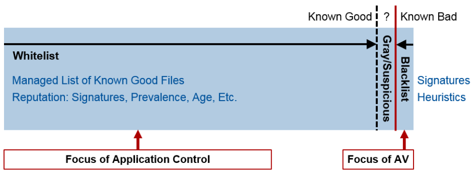
- It is known to be bad, so we want to block it (and allow everything else, also known as blacklisting)
- It is known to be good, so we want to allow it (and block everything else, also known as whitelisting)
- It is unknown.
Gartner: “We have made the lines between the styles dashed. Many technologies will overlap in their protection styles as the offerings converge during the next several years. Nine different solutions are not needed!”
WARNING: Gartner flipped the first and 2nd columns around between their 2005 and 2006 papers. They also improved some of the terms and wording.
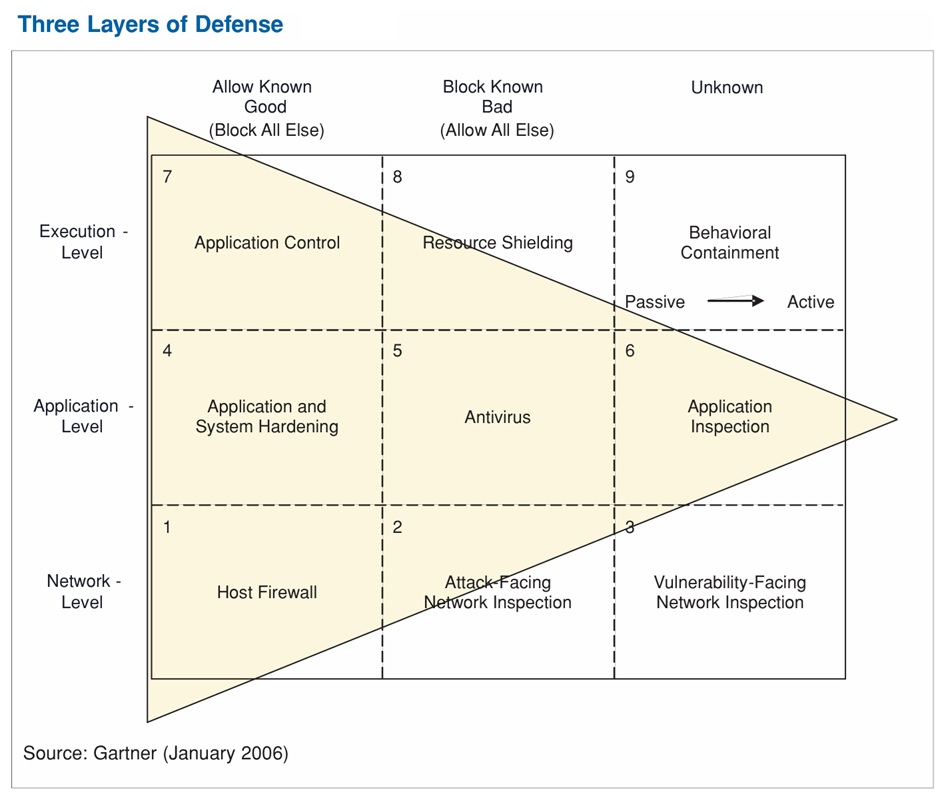
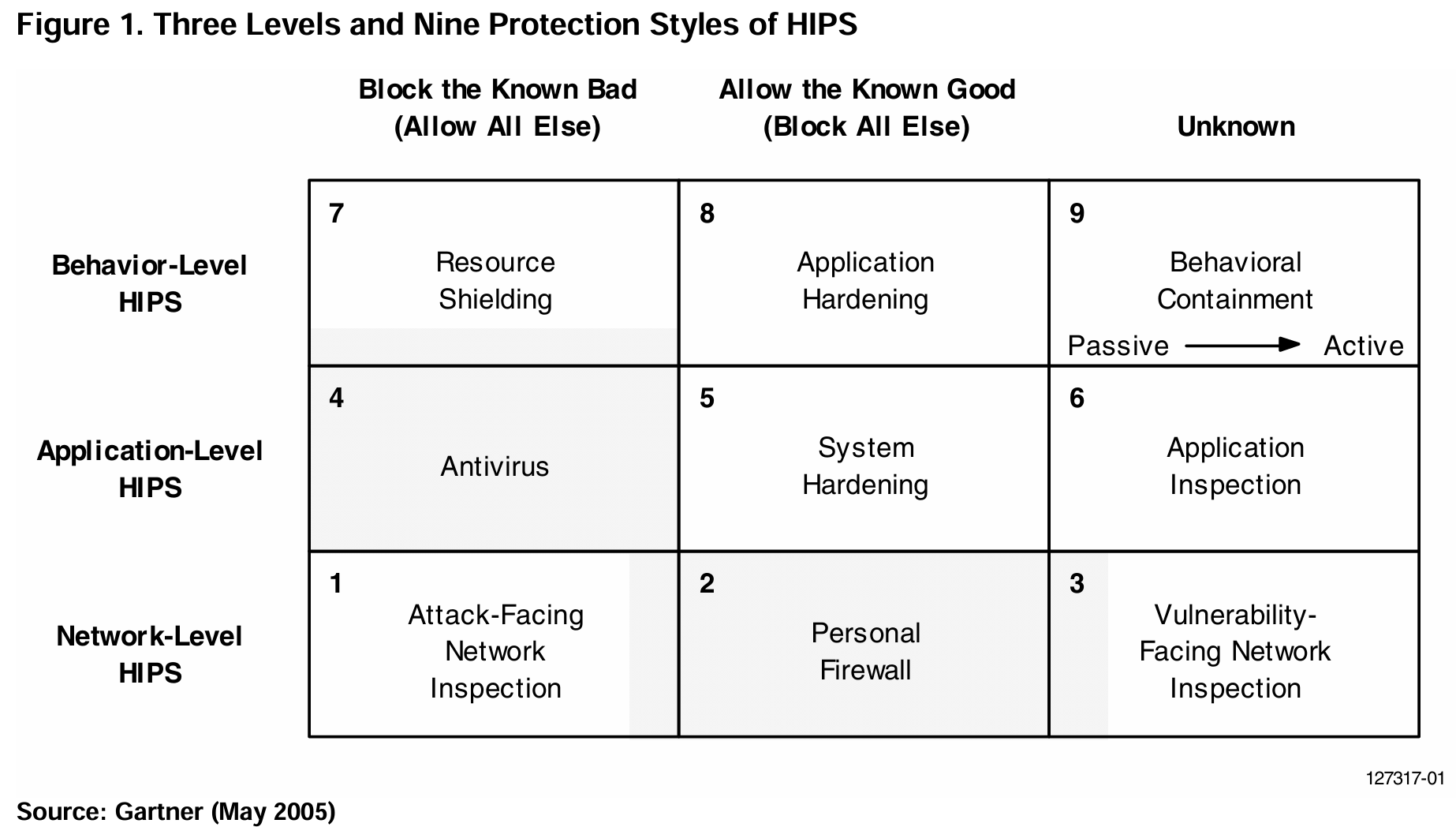
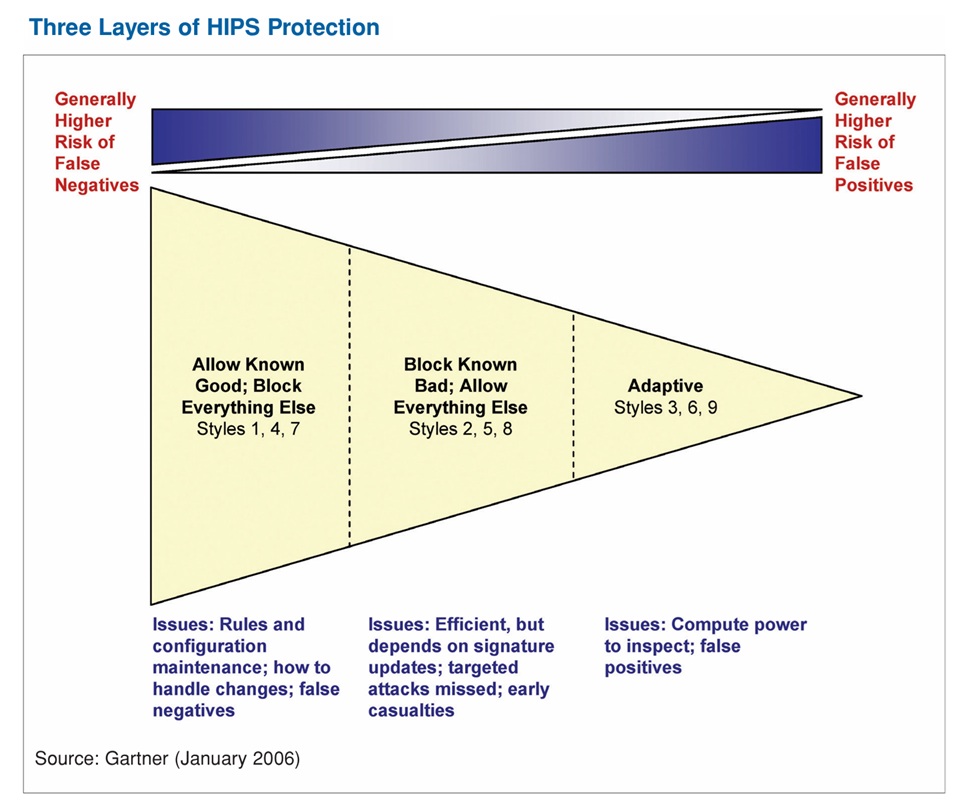
By looking at all the possible combinations, we have collectively described the nine protection styles of host-based intrusion protection. Each style has its strengths and weaknesses. For styles in the first column, blocklists are the least likely to create false positives but are reactive. In the second column, whitelists are straightforward (but not easy) to implement due to challenges with determining what “known good” is and keeping it up to date. The third column is the most proactive and flexible, but it has the highest potential for false positives, and the contextual inspection required is typically more resource intensive. Looking across the nine styles of HIPS facilitates vendor comparison (functionality and applicability) and the determination of which combination of styles makes the most sense for the endpoint protection strategy. Many of the HIPS providers incorporate multiple styles of protection. Just as in network intrusion prevention system (IPS), a better HIPS will use multiple techniques.
Network-Level protection (Styles 1, 2 and 3)
Network-level protection examines the incoming (and, ideally, outgoing) network traffic stream to provide protection against malicious code with the goal of detecting, blocking and removing the malicious code before it ever gets onto the machine.
Host firewalls are well-established in the second column to provide network-level system protection by configuring what known good applications need to access the network and setting the firewall rules to allow this. Some provide screening for known and unknown attacks, overlapping with Columns 1 and 3.
The first column of network-level protection examines the network traffic stream for the signatures of known bad traffic — also referred to as attack-facing signatures. Protection at this level performs pattern detection and removal of known bad bits by using a signature "blacklist" of known attacks (for example, worms, port-scanning, operating system (OS)-fingerprinting, malformed protocols and so on). Deep packet inspection products in this category can detect obfuscated attacks that span multiple packets and viruses in reassembled attachments.
The third column of network-level protection examines the network traffic stream for unknown malicious code but doesn't rely on attack-facing signatures for detection. In this HIPS style, vulnerability-facing behavioural filtering techniques are used for malicious traffic detection and removal. For example, rather than look for every variant of a worm using signatures, by inspecting network traffic for specific buffer overflow techniques, a single vulnerability-facing filter would detect all attacks, known and unknown, aimed at exploiting a service. Vulnerability-facing behavioural filtering is more complex and resource-intensive than attack-facing inspection and requires deep packet inspection, with some level of vulnerability contextual awareness — in some cases, by disassembly and simulation of embedded code. In most cases, when malicious code is detected, vendors simply drop the malicious packets. However, some providers enable the ability to modify content within the packets. With deeper inspection, some providers offer the ability to understand the context of the conversation — for example, check for malformed HTTP and Structured Query Language (SQL) queries — and to modify content within an application context.
Application-Level protection (Styles 4, 5 and 6)
Application-level HIPS examine the characteristics of an application's code on the machine with the goal of detecting, blocking and removing malicious code before it is executed.
In the first column, traditional antivirus solutions are well-established and use signatures to detect and remove known malicious code. As shown in Figure 1, most antivirus solutions also will perform some real-time scanning of memory during execution and provide "known bad" memory protection as applications are executing, overlapping somewhat with the resource-shielding style above.
The second column contains a style of HIPS that will lock down a system (also known as system hardening) based on a known good application configuration so that no other application can execute. Some providers also include the base OS in the hardening process. This style works well for embedded systems, fixed-function servers and kiosks that rarely change and that don't have users downloading unknown applications.
The third column of this level represents the most complex style of an application-level HIPS. Here, the solution must inspect the application's code, look at the types of system calls and application programming interfaces (APIs) that are used, contextually understand the activities that the application would perform if it was executed and block potentially malicious code. This can be achieved by exercising the application's code paths using a simulated environment or by using reverse-engineering techniques to inspect code to determine malicious characteristics before the application is allowed to be saved or executed on the machine.
Behaviour-Level protection (Styles 7, 8 and 9)
Behaviour-level HIPS examine the characteristics of executing code with the goal of detecting, blocking and removing the ability of executing malicious code to damage to the system. This level represents the last line of defence, because the malicious code has entered the system and is now executing.
In the first column, we already discussed how some antivirus products will scan for the signatures of known bad executing applications. Furthermore, many HIPS providers can block signatures of known bad application behaviours (for example, no application should ever execute code from memory flagged for data usage, and no application should ever change OS files). Because many worms and viruses depend on buffer overflow techniques to install their malicious payload, this HIPS style detects and prevents installation of the payload but may result in a denial of service to the underlying process. Some of this style of HIPS is delivered as part of most OSs today. (see also AC-01, CM-01)
In the second column, application control/whitelisting (CM-04) provides the ability to lock down a known good application's access to only those system resources it legitimately needs, including network ports, APIs, areas of disk, memory and areas of the registry. For known, profiled applications, the HIPS provider should include a rich library of application and usage profiles out of the box. Application hardening HIPS should also provide a learning mode for applications so that organizations may create additional profiles. If the OS doesn't provide granular resource-blocking capabilities, application hardening HIPS providers either inset "shim" code between applications and resource access to "virtualize" or "sandbox" the application from its resources, or run the known applications in their own virtual machine. Then, rules are applied to enable known good applications to access only the resources they need to execute. One of the drawbacks of application hardening is how unknown, unprofiled applications are handled. (see also AC-01, CM-01, CM-04)
The final column of behaviour-level HIPS — behavioural containment — contains the potential malicious behaviour of unknown executing applications. Multiple technology approaches range from passive to active behavioural containment. Passive behavioural containment typically uses "sandboxing"(AC-04), virtualization or lower-privileged accounts to limit the damage from malicious applications. Here, HIPS providers create a completely virtualized environment for the execution of unknown code. Little or no attempt is made at behavioural monitoring or blocking. The malicious code is allowed to execute, but no damage to the underlying system is possible (but it also may affect the usefulness of the application). More-active containment solutions apply rules for allowed and disallowed behaviours of the unknown code in the virtualized environment. Other active behavioural containment HIPS styles don't rely on virtualization and, instead, inspect and monitor the behaviour of the application to detect and contain applications determined to be malicious. Some HIPS providers monitor the application over time and look for changes in activities and divergence from normal patterns of memory access, systems access and so on, and typically they require a learning period to baseline normal behaviour. Other behavioural containment providers heuristically inspect executing applications against a large set of good and bad application behaviours to determine and stop malicious intent without requiring a learning period.
¶ ISM controls and the nine protection styles
Here these nine protection styles are mapped to ISM controls. These are example controls, not a comprehensive set. ASD's introduction and guide to using the ISM states
While security risks and security controls are discussed in the cyber security guidelines, and act as a baseline, they should not be considered an exhaustive list for a specific system type or technology.
What's important is to understand the function and value of the nine protection styles. This understanding plus knowing the system context and technical specifics will guide the selection and design of controls.
| Block known bad | Allow known good | Unknown | |
| Execution level (Behaviour-level) |
Resource Shielding | Application Control/Whitelisting | Behavioural Containment |
| Application level | Anti-virus/anti-malware | System and Application Hardening | Application Inspection |
| Network level | Attack-Facing Network Inspection | Host Firewall | Vuln facing network inspection |
Network-level protection examines the incoming (and, ideally, outgoing) network traffic stream to provide protection against malicious code with the goal of detecting, blocking and removing the malicious code before it ever gets onto the machine.
Application-level HIPS examine the characteristics of an application's code on the machine with the goal of detecting, blocking and removing malicious code before it is executed.
Execution-level HIPS examine the characteristics of executing code with the goal of detecting, blocking and removing the ability of executing malicious code to damage to the system. This level represents the last line of defence, because the malicious code has entered the system and is now executing.
¶ Resource Shielding (exec level)
many HIPS providers can block signatures of known bad application behaviours (for example, no application should ever execute code from memory flagged for data usage, and no application should ever change OS files). Because many worms and viruses depend on buffer overflow techniques to install their malicious payload, this HIPS style detects and prevents installation of the payload but may result in a denial of service to the underlying process. Some of this style of HIPS is delivered as part of most OSs today.
A subset of HIPS protection styles provides a “big bang for a security buck” solution without the huge complexity of managing signatures. Essentially, some solutions enforce the simple rule/signature that there are some things executing applications should never do. Buffer overflow is one example. Overwriting system files is another. Here, these “universal signatures” of badness are relatively static and as such are easy to manage (a buffer overflow is always bad; users don’t need to have a signature update to tell them this).
| ISM Control | Description | E8 Maturity Level 1 | E8 Maturity Level 2 | E8 Maturity Level 3 |
|---|---|---|---|---|
| ISM-1658 | Application control restricts the execution of drivers to an organisation-approved set. | No | No | Yes |
| ISM-1659 | Microsoft’s vulnerable driver blocklist is implemented. | No | No | Yes |
See also
- Address space layout randomization (ASLR)
- Linux: Seccomp (Secure Computing Mode): Limits the specific system calls an application can make to the kernel.
¶ Application Control/Whitelisting (exec level)
application control/whitelisting provides the ability to lock down a known good application's access to only those system resources it legitimately needs, including network ports, APIs, areas of disk, memory and areas of the registry. For known, profiled applications, the HIPS provider should include a rich library of application and usage profiles out of the box. Application hardening HIPS should also provide a learning mode for applications so that organizations may create additional profiles. If the OS doesn't provide granular resource-blocking capabilities, application hardening HIPS providers either inset "shim" code between applications and resource access to "virtualize" or "sandbox" the application from its resources, or run the known applications in their own virtual machine. Then, rules are applied to enable known good applications to access only the resources they need to execute. One of the drawbacks of application hardening is how unknown, unprofiled applications are handled.
| ISM Control | Description | E8 Maturity Level 1 | E8 Maturity Level 2 | E8 Maturity Level 3 |
|---|---|---|---|---|
| ISM-0843 | Application control is implemented on workstations. | Yes | Yes | Yes |
| ISM-1870 | Application control is applied to user profiles and temporary folders used by operating systems, web browsers and email clients. | Yes | Yes | Yes |
| ISM-1657 | Application control restricts the execution of executables, software libraries, scripts, installers, compiled HTML, HTML applications and control panel applets to an organisation-approved set. | Yes | Yes | Yes |
| ISM-1490 | Application control is implemented on internet-facing servers. | No | Yes | Yes |
| ISM-1871 | Application control is applied to all locations other than user profiles and temporary folders used by operating systems, web browsers and email clients. | No | Yes | Yes |
| ISM-1544 | Microsoft’s recommended application blocklist is implemented. | No | Yes | Yes |
| ISM-1582 | Application control rulesets are validated on an annual or more frequent basis. | No | Yes | Yes |
| ISM-1660 | Allowed and blocked application control events are centrally logged. | No | Yes | Yes |
| ISM-1656 | Application control is implemented on non-internet-facing servers. | No | No | Yes |
See also
- Linux
- Flatpak / Snap: Package managers that bundle applications with automated sandbox permissions for desktop isolation
- AppArmor / SELinux: Mandatory Access Control (MAC) systems that enforce strict security policies across the system
¶ Behavioural Containment (exec level)
The final column of behaviour-level HIPS — behavioural containment — contains the potential malicious behaviour of unknown executing applications. Multiple technology approaches range from passive to active behavioural containment. Passive behavioural containment typically uses "sandboxing", virtualization or lower-privileged accounts to limit the damage from malicious applications. Here, HIPS providers create a completely virtualized environment for the execution of unknown code. Little or no attempt is made at behavioural monitoring or blocking. The malicious code is allowed to execute, but no damage to the underlying system is possible (but it also may affect the usefulness of the application). More-active containment solutions apply rules for allowed and disallowed behaviours of the unknown code in the virtualized environment. Other active behavioural containment HIPS styles don't rely on virtualization and, instead, inspect and monitor the behaviour of the application to detect and contain applications determined to be malicious. Some HIPS providers monitor the application over time and look for changes in activities and divergence from normal patterns of memory access, systems access and so on, and typically they require a learning period to baseline normal behaviour. Other behavioural containment providers heuristically inspect executing applications against a large set of good and bad application behaviours to determine and stop malicious intent without requiring a learning period.
| ISM Control | Description |
|---|---|
- Windows Sandbox(WSB) offers a lightweight, isolated desktop environment for safely running applications. It's ideal for testing, debugging, exploring unknown files, and experimenting with tools. Applications installed within the sandbox remain isolated from the host machine using hypervisor-based virtualization. As a disposable virtual machine (VM), Windows Sandbox ensures reboot persistence, quick launch times, and a lower memory footprint compared to full VMs. Its one-click setup simplifies the user experience.
- Linux
- Namespaces: Hide or restrict access to system resources like the network, process IDs (PID), and file mounts.
- gVisor is an open-source container sandbox developed by Google
¶ Anti-virus/anti-malware (app level)
| ISM Control | Description |
|---|---|
¶ System and Application Hardening (app level)
| ISM Control | Description | Maturity Level 1 | Maturity Level 2 | Maturity Level 3 |
| ISM-1654 | Internet Explorer 11 is disabled or removed. | Yes | Yes | Yes |
| ISM-1655 | .NET Framework 3.5 (includes .NET 2.0 and 3.0) is disabled or removed. | No | No | Yes |
| ISM-1889 | Command line process creation events are centrally logged. | No | Yes | Yes |
| ISM-1621 | Windows PowerShell 2.0 is disabled or removed. | No | No | Yes |
| ISM-1622 | PowerShell is configured to use Constrained Language Mode. | No | No | Yes |
| ISM-1623 | PowerShell module logging, script block logging and transcription events are centrally logged. | No | Yes | Yes |
| ISM-1667 | Microsoft Office is blocked from creating child processes. | No | Yes | Yes |
| ISM-1668 | Microsoft Office is blocked from creating executable content. | No | Yes | Yes |
| ISM-1669 | Microsoft Office is blocked from injecting code into other processes. | No | Yes | Yes |
| ISM-1542 | Microsoft Office is configured to prevent activation of Object Linking and Embedding packages. | No | Yes | Yes |
| ISM-1859 | Office productivity suites are hardened using ASD and vendor hardening guidance, with the most restrictive guidance taking precedence when conflicts occur. | No | Yes | Yes |
| ISM-1823 | Office productivity suite security settings cannot be changed by users. | No | Yes | Yes |
| ISM-1486 | Web browsers do not process Java from the internet. | Yes | Yes | Yes |
| ISM-1485 | Web browsers do not process web advertisements from the internet. | Yes | Yes | Yes |
| ISM-1412 | Web browsers are hardened using ASD and vendor hardening guidance, with the most restrictive guidance taking precedence when conflicts occur. | No | Yes | Yes |
| ISM-1585 | Web browser security settings cannot be changed by users. | Yes | Yes | Yes |
| ISM-1670 | PDF applications are blocked from creating child processes. | No | Yes | Yes |
| ISM-1860 | PDF applications are hardened using ASD and vendor hardening guidance, with the most restrictive guidance taking precedence when conflicts occur. | No | Yes | Yes |
| ISM-1824 | PDF application security settings cannot be changed by users. | No | Yes | Yes |
¶ Application Inspection (app level)
| ISM Control | Description |
|---|---|
¶ Attack-Facing Network Inspection (network level)
| ISM Control | Description |
|---|---|
¶ Host Firewall (network level)
| ISM Control | Description |
|---|---|
¶ Vuln facing network inspection (network level)
| ISM Control | Description |
|---|---|
¶ Supporting diagrams
.jpg)
¶ References
- Gartner - Understanding Strengths and Weaknesses of Host-Based Intrusion Prevention Styles (30 Jan 2006) G00137366
- Gartner - Understanding the Nine Protection Styles of Host-Based Intrusion Prevention (27 May 2005) G00127317
- Gartner - Decision Point for Postmodern Security Zones - (Nov 2019) - ID G00451287
- Market Guide for Cloud Workload Protection Platforms – https://www.gartner.com/en/documents/4003465
- https://www.cyber.gov.au/business-government/asds-cyber-security-frameworks/ism
- Industrial Internet of Things Volume G4: Security Framework [IIC:PUB:G4:V1.0:PB:20160926]
- https://www.philvenables.com/post/attack-surface-management
- https://www.cyber.gov.au/protect-yourself/securing-your-devices/how-secure-your-devices
- https://www.cyber.gov.au/business-government/protecting-devices-systems/